← All projectsKimya Ghasemlou

Project 02

SahaEtüt

An Android app for dam-site field surveys, built at TMC Proje for a DSİ project.

Role
Solo developer (Android app, Go server, deployment)
Platform
Android
Timeline
Sep 2026 – present
Stack
Kotlin, Jetpack Compose, Room, CameraX, WorkManager, OkHttp, Go, SQLite, Caddy
In progress

The problem

Previously, engineers took photos with their phones and recorded notes on paper during field surveys. Back at the office, they had to manually organize the data into Excel and KMZ files. This process was slow and prone to errors, especially when notes were difficult to read or too much time had passed to recall missing details. With the project expanding, field surveys and office processing will be handled by different engineers, making these problems more significant. SahaEtüt replaces this workflow with structured digital data collection, reducing manual work and making field records easier to process.

What I did

I built the Android app, the Go sync server, and the deployment alone.

The server runs on an office PC behind Caddy, with device pairing and TLS.
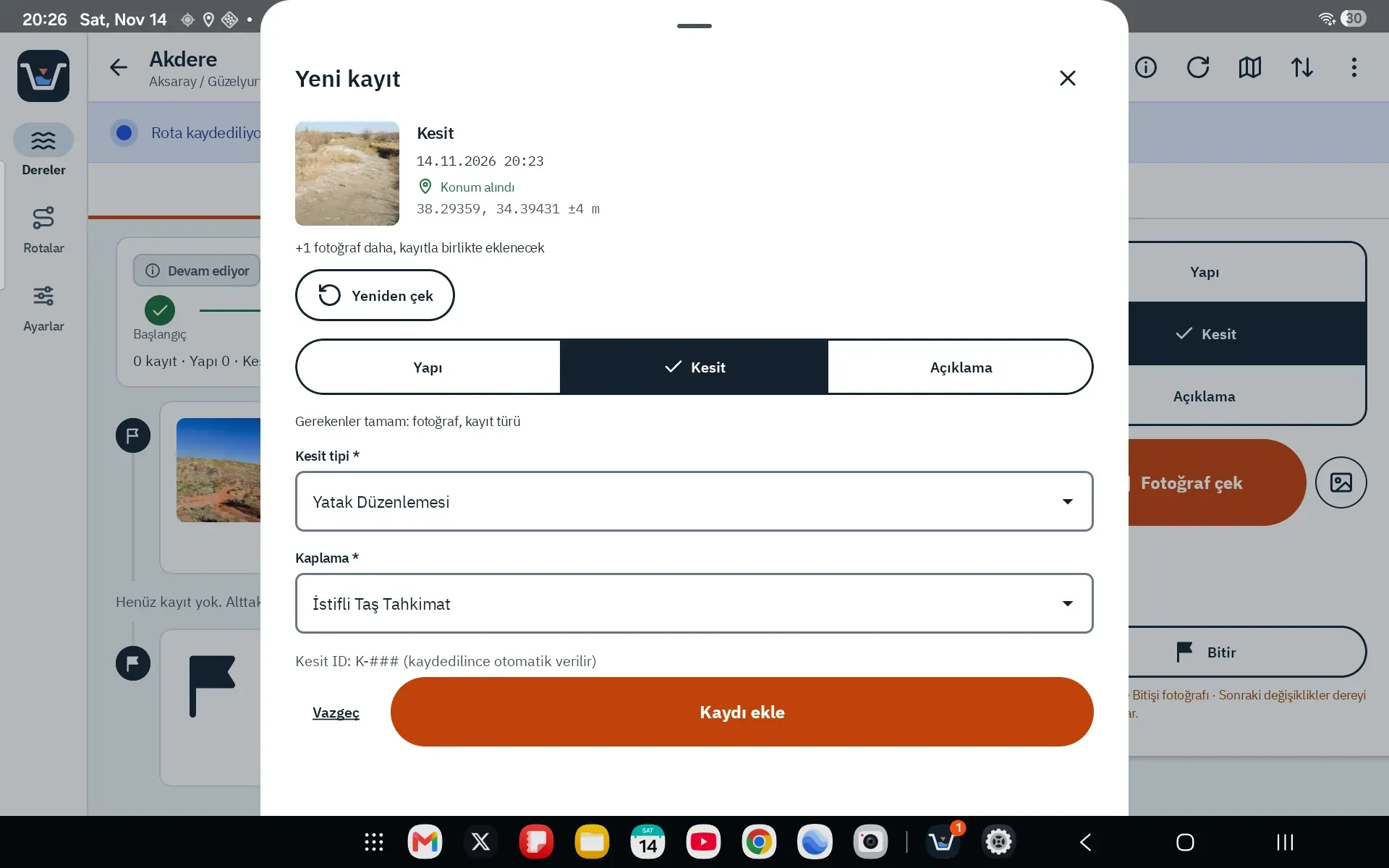
  • SahaEtüt new record sheet on a tablet: a creek photo with its time and GPS coordinates, and the Kesit form with type and lining filled in.
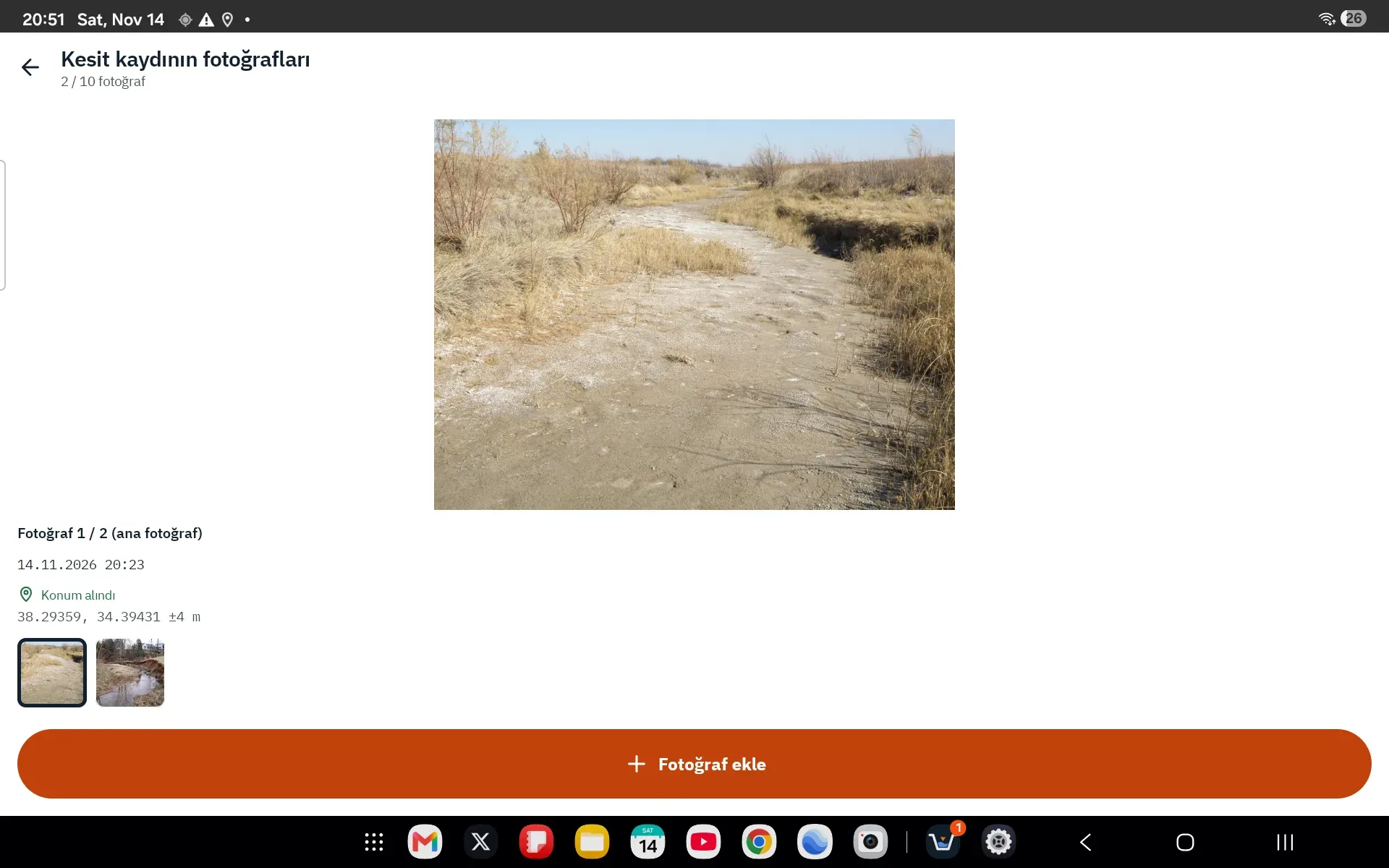
  • SahaEtüt photo screen: the first of two photos of a record, with its own time and GPS coordinates.
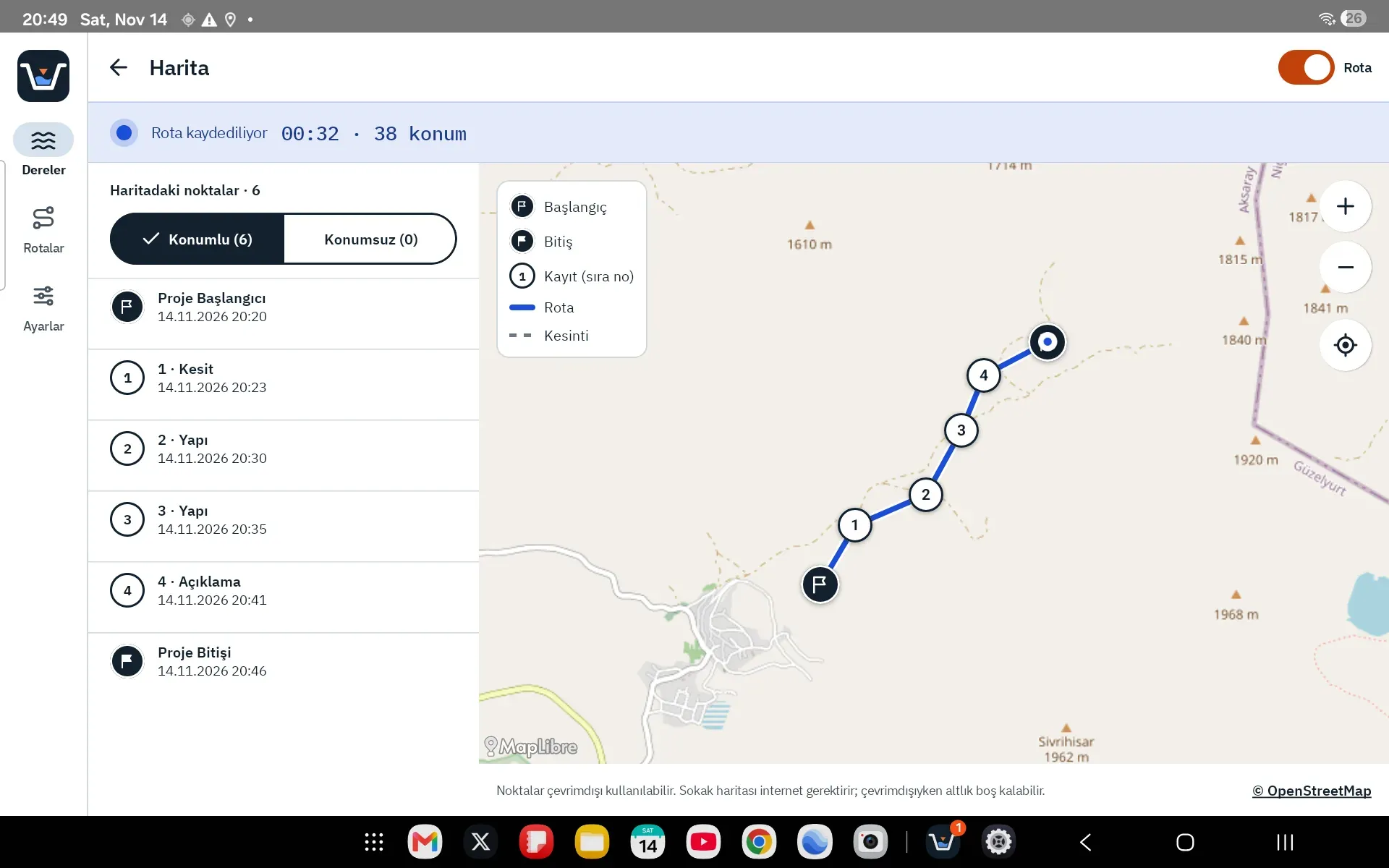
  • SahaEtüt map: the start, four records and the end of one creek as numbered points, joined by the recorded route.
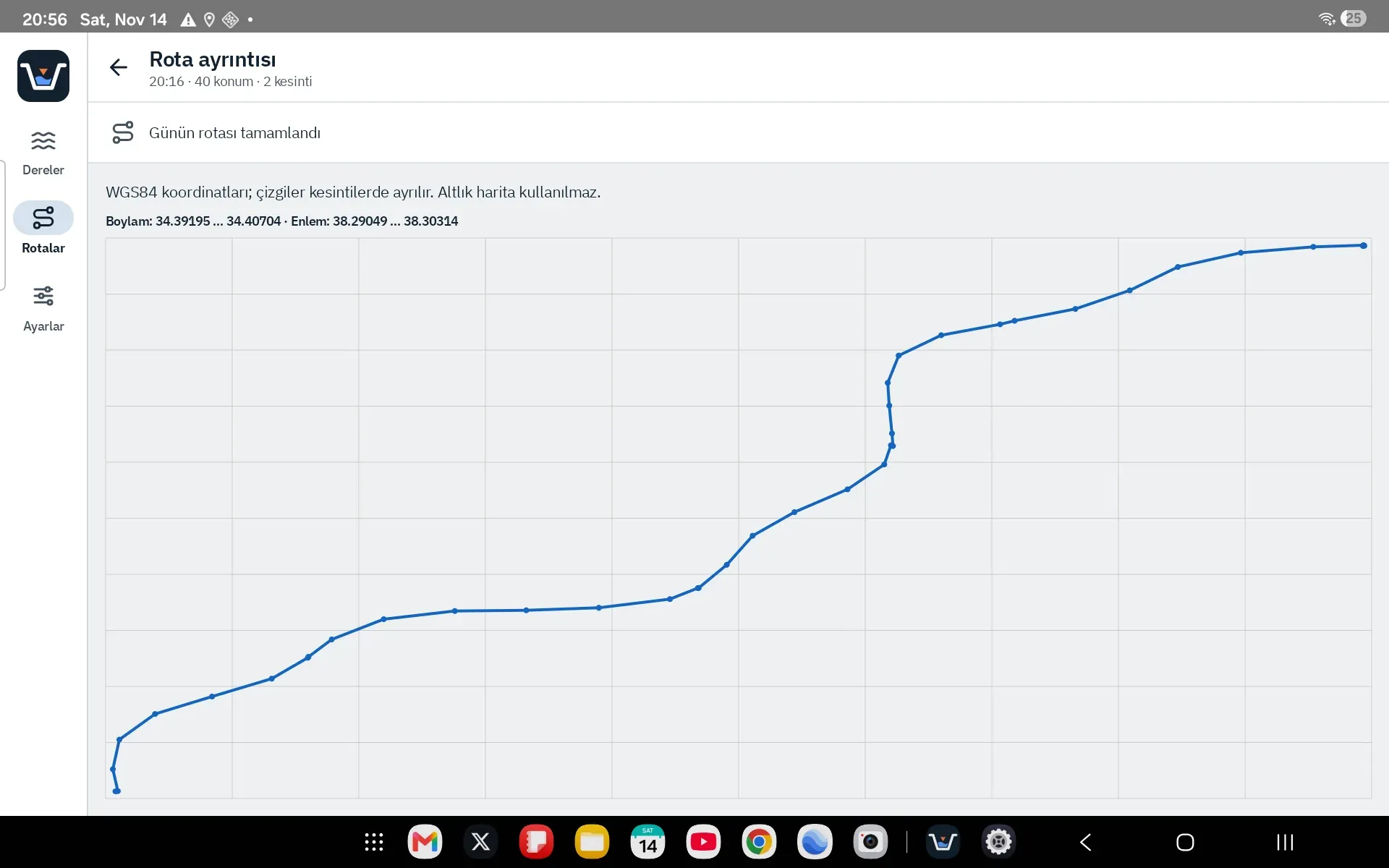
  • SahaEtüt route detail: the day's recorded GPS track drawn as a line of points.

Screens from the app with demo data: stock photos (CC0 / public domain) and a simulated GPS route.

A sample of the daily route video the server makes from one day's route, records and photos. Sample data.

Decomposition and deployment

Code runs in two places, the tablet and the office server PC, and only the reverse proxy is reachable from the internet.

Decomposition and deployment of SahaEtütTwo groups. On the tablet in the field: the tablet app, with the modules screens, capture, local database, sync, and pairing and device token, and the photo files in the tablet's Gallery album. On the office server PC: a Caddy reverse proxy that terminates HTTPS on port 443 and forwards only tablet API paths; the API server, one process with the modules tablet API, device authentication, admin pages, storage layer and archive job; a SQLite database file; and photo storage with an incoming folder and an archive folder. A dashed trust boundary shows that only the reverse proxy is reachable from the internet. The API server, the admin pages, the database and the photo storage are local to the server PC.Tablet · in the fieldTablet appCaptures records and photos offline; syncs later.ScreensForms, camera, map, sync statusCaptureTakes photos, stamps location, saves filesLocal databaseRecords, photo list, sync queueSyncBackground worker that sends queued changesPairing and device tokenGets and keeps the tablet's credentialPhoto filesOriginal photos, kept in the tablet's Gallery albumHTTPS, port 443InternetReverse proxy (Caddy)Terminates HTTPS on port 443.Forwards only tablet API paths to the API server.▲ Reachable from the internet▼ Local to the server PC onlyAPI server (one process)Stores what tablets send and serves the office.Tablet APIAccepts records, photo parts, finish requestsDevice authenticationChecks the device token on every requestAdmin pagesPairs tablets, lists surveys, exports Excel/KMZStorage layerOnly code that reads and writes the databaseArchive jobMoves verified photos from incoming to archiveDatabaseSQLite file. Syncedrecords, revisions,paired devices.Photo storageIncoming folder for newuploads, archive folderfor verified photos.Office server PCDecomposition and deployment of SahaEtütTwo groups. On the tablet in the field: the tablet app, with the modules screens, capture, local database, sync, and pairing and device token, and the photo files in the tablet's Gallery album. On the office server PC: a Caddy reverse proxy that terminates HTTPS on port 443 and forwards only tablet API paths; the API server, one process with the modules tablet API, device authentication, admin pages, storage layer and archive job; a SQLite database file; and photo storage with an incoming folder and an archive folder. A dashed trust boundary shows that only the reverse proxy is reachable from the internet. The API server, the admin pages, the database and the photo storage are local to the server PC.Reverse proxy (Caddy)HTTPS, tablet API only▲ Reachable from the internet▼ Local to the server PC onlyAPI server (one process)Stores and serves dataTablet APIRecords and photo partsDevice authenticationChecks every requestAdmin pagesPairing, lists, exportsStorage layerOnly database accessArchive jobMoves verified photosDatabaseSQLite filePhoto storageIncoming and archive foldersOffice server PCTablet appWorks offline, syncs laterScreensForms, camera, mapCapturePhotos with locationLocal databaseRecords and sync queueSyncSends queued changesPairing and device tokenKeeps the tablet's credentialPhoto filesIn the Gallery albumTablet · in the fieldHTTPS, port 443Internet

Photo Ingestion and Sync Pipeline

A photo's lifecycle runs from capture to sync confirmation on the tablet. Since files and database records are saved separately on both the tablet and server, a crash between these operations can leave incomplete data.

  1. Capture

    Photo file

    The camera's temp file is flushed to disk and moved into the Gallery album. The app computes its SHA-256.

    The file move and the database transaction are two separate steps, not one atomic operation.

    Record and sync queue

    One Room transaction writes the record, its photo row and its sync-queue entries.

  2. Sync

    Resumable upload

    The tablet asks the server how many bytes it holds and sends 512 KiB chunks from there. The server flushes each chunk to disk before it records the new offset.

    Verification

    After the last byte, the server checks the SHA-256 and that the JPEG decodes fully, moves the file to its final path, then marks the photo complete in its database.

    Revision-aware acknowledgement

    The tablet accepts the result only if the photo, revision, size and checksum match what it sent. A retake made in the meantime stays queued.

    A rejected photo stops retrying until the engineer retries or retakes it.

  3. Archive

    Archiving photos without trusting a bad copy.

    A background job (hourly by default) copies photos older than a day to the archive through a temp file, re-hashes the copy, and renames it into place only if it matches. Only then is the photo marked archived and the working copy deleted.

System design

Communication between the SahaEtüt componentsEvery call starts at the tablet app and goes to the reverse proxy over HTTPS. The pairing call sends a pairing code without a token and returns the device token. Four calls carry the device token: record data, photo chunks, the finish request and the field catalogue. The reverse proxy forwards the same requests to the API server over local HTTP. The API server checks the device token before any storage access, runs SQL in process on the SQLite database file, and writes photo bytes to photo storage. Its archive job moves photos from the incoming folder to the archive folder. An office browser on the server PC reaches the admin pages over local HTTP with an admin login. The tablet app owns unsynced records and their revision numbers. The API server owns the synced copy and each photo's upload progress, and stores only a hash of the token.Tablet appOwns unsyncedrecords andtheir revisionnumbers.ReverseproxyTerminatesHTTPS onport 443.HTTPS: pairing codeHTTPS: record dataHTTPS: photo chunksHTTPS: finish requestHTTPS: field cataloguereturns the device tokenDevice token sent with the callNo token yet, rate limitedEvery call starts at the tablet.local HTTP: same requestsAPI serverChecks the device token before any storage accessOwns the synced copy and each photo's uploadprogress. Stores only a hash of the token.Archive jobAdmin pagesDatabaseSQLite fileon the PCPhoto storageIncoming folder,archive folderOfficebrowserOn this PC,admin loginin-process:SQLfile write:photo bytesfile move:incomingto archivelocal HTTP:pages,exports
Every call starts at the tablet, and the API server checks the device token before it reads or writes anything.
Sync protocol: one record with photos, from the field to the serverSequence between the engineer, the tablet app UI, the tablet's local database, the sync worker, the reverse proxy, the API server and the server storage. Calls between the sync worker and the API server pass through the reverse proxy. Offline in the field: 1. Save a record with photos (Engineer to Tablet app UI). 2. One transaction: record, photo list, sync queue (Tablet app UI to Local database). No connection: the worker waits. Then it returns.: 3. Read the queue: record data before photos (Sync worker to Local database). 4. HTTPS: record data with client-made ID and revision (Sync worker to API server). 5. Check device token, store the record (API server to Server storage). 6. Confirmed: ID and revision (API server to Sync worker). 7. Save the acknowledged revision (Sync worker to Local database). Each photo, uploaded in parts: 8. How many bytes of this photo do you hold? (Sync worker to API server). 9. None (API server to Sync worker). 10. Part 1: byte range and whole-file checksum (Sync worker to API server). 11. Write the bytes, record the new offset (API server to Server storage). 12. Received so far: N bytes (API server to Sync worker). Connection drops, then returns: 13. How many bytes do you hold? (Sync worker to API server). 14. N bytes (API server to Sync worker). 15. Remaining parts, from byte N (Sync worker to API server). 16. Verify size, checksum and that the image decodes (API server to Server storage). 17. Complete, with the stored file's checksum (API server to Sync worker). 18. Checksums are equal: mark the photo uploaded (Sync worker to Local database). 19. Show the item as confirmed (Local database to Tablet app UI). Failure: the confirmation in step 6 is lost: Same ID and revision sent again (Sync worker to API server). Confirmed again, nothing changes (API server to Sync worker). Failure: the checksum does not match in step 16: Discard the bytes, reset the upload to byte 0 (API server to Server storage). Rejected: checksum mismatch (API server to Sync worker). Mark the photo failed, no automatic retry (Sync worker to Local database). Engineer taps retry (Engineer to Tablet app UI). File sent again from byte 0 (Sync worker to API server).EngineerTabletapp UILocaldatabaseSyncworkerReverseproxyAPIserverServerstorageOffline in the field1. Save a record with photos2. One transaction: record, photo list, sync queueNo connection: the worker waits. Then it returns.3. Read the queue: record data before photos4. HTTPS: record data with client-made ID and revision5. Check device token, store the record6. Confirmed: ID and revision7. Save the acknowledged revisionEach photo, uploaded in parts8. How many bytes of this photo do you hold?9. None10. Part 1: byte range and whole-file checksum11. Write the bytes, record the new offset12. Received so far: N bytesConnection drops, then returns13. How many bytes do you hold?14. N bytes15. Remaining parts, from byte N16. Verify size, checksum and that the image decodes17. Complete, with the stored file's checksum18. Checksums are equal: mark the photo uploaded19. Show the item as confirmedFailure: the confirmation in step 6 is lostSame ID and revision sent againConfirmed again, nothing changesFailure: the checksum does not match in step 16Discard the bytes, reset the upload to byte 0Rejected: checksum mismatchMark the photo failed, no automatic retryEngineer taps retryFile sent again from byte 0call or actionresponsethrough the proxy
Record data is sent first, each photo follows in parts, and the byte count the server reports is the only resume point.
Lifecycle of a survey stream, an item's record data and a photoThree state machines. Stream: in progress becomes finished on tablet when the engineer taps Finish, which works offline and queues a snapshot of revisions and checksums. Finished on tablet becomes finished and confirmed when the server holds exactly that snapshot with every photo verified. Any edit, add, delete, reorder or photo retake returns either finished state to in progress. From any state, deleting the stream erases it on the tablet and the server. Record data of one item: local becomes syncing when the worker sends it, and confirmed when the server confirms this revision. A network or server error moves it to failed, will retry, and it is retried with backoff. If the server rejects the content it is blocked until the engineer edits or retries. Any edit returns a confirmed item to local with a new revision. Photo: pending becomes uploading when the worker starts the upload, and uploaded when the server verified the file and the checksums are equal. A lost connection or temporary error returns it to pending. A failed checksum, image or size check moves it to failed until the engineer retries. A retake returns an uploaded photo to pending with a new revision.Stream (one survey)Engineer taps Finish (works offline);a snapshot of revisions and checksums is queuedServer holds exactly that snapshot,with every photo verifiedAny edit, add, delete,reorder or photo retakereopensreopensIn progressFinished on tabletFinished and confirmedDeleted: from any state, the stream is erasedon the tablet and the server.Record data (one item)worker sends itserver rejects the contentengineer editsor retriesnetwork orserver errorretried withbackoffserver confirmsthis revisionConfirmed returns to Local on any edit: a new revision.LocalSyncingConfirmedBlockedFailed,will retryPhoto (one file)connection lost,temporary errorworker starts the uploadchecksum, imageor size failsengineer retriesserver verified the file,checksums are equalUploaded returns to Pending on a retake: a new revision.PendingUploadingUploadedFailed
Finish does not lock a survey: any later change returns it to in progress.

Under the hood

Data Integrity, Fault Tolerance & Recovery

  • Challenge

    A photo can be deleted from the shared Gallery outside the app.

    Decision

    Check that the referenced photo file still exists before uploading it.

    Why

    The app must not upload a different file in place of a missing photo.

    Trade-off

    If the photo is missing, its upload fails and needs the engineer's attention.

  • Challenge

    Interrupted uploads over unreliable network connections.

    Decision

    Resumable uploads in 512 KiB chunks, for photos up to a 10 MiB limit. The tablet always resumes from the offset the server confirms, and the server accepts a photo only when the SHA-256 of the stored file matches the one the tablet declared.

    Why

    If the connection drops, the tablet can continue from the last confirmed position instead of sending the whole file again.

    Trade-off

    A lost partial file or a rejected photo restarts the upload at zero. Retrying a write can't create a second record, because each write is keyed by a client-generated ID, but nothing stops the same point being captured twice.

  • Challenge

    Archiving photos without trusting a bad copy.

    Decision

    A background job (hourly by default) copies photos older than a day to the archive through a temp file, re-hashes the copy, and renames it into place only if it matches. Only then is the photo marked archived and the working copy deleted.

    Why

    At every step at least one verified copy exists, and the database never points to a file that was removed.

    Trade-off

    Deleting a record in the app erases its server files, including the archive copy.

The result

Automated verification

AreaWhat the tests coverVerification scope
Android appThe app's main workflows, including local persistence and sync.703 automated tests.
Go serverAPI behavior and data-processing logic, including upload verification and archiving.301 top-level test functions.